MANNIN SYSTEMS

Mannin Systems / Free templates

Free setup and run time log for machine shops

Record actual setup and run times against what you quoted, flag the jobs that ran over, and work out the real cycle time for each part, so your next quote is based on facts rather than memory.

For machine shops. No sign-up and no email address needed. Works in Excel, Google Sheets and LibreOffice.

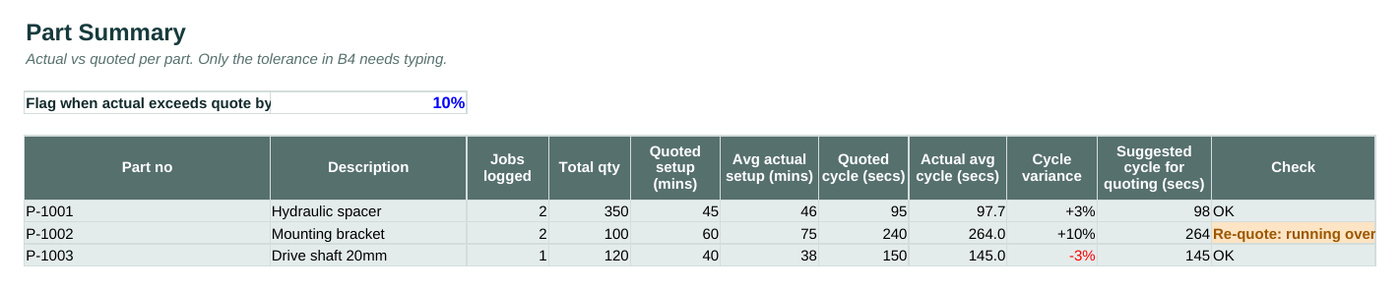
The Part Summary tab of the free setup and run time log template, filled in with example data
The Part Summary tab, with the example data it comes with. Blue cells are for typing; grey cells calculate.

What’s inside

Start Here
What it does, how to use it, and the key to which cells to type in.
Parts
Each part with its machine, quoted setup time in minutes and quoted cycle time in seconds.
Time Log
One row per job or batch: quantity, actual setup minutes and actual run minutes, with variances and flags worked out.
Part Summary
Average actual setup and cycle times per part against the quote, with a suggested cycle time for future quoting.

How to use it

  1. List each part with its machine and the setup and cycle times you quoted.

  2. For every job, log the quantity made, the actual setup time and the actual run time.

  3. Set how far over the quote you’ll tolerate before a job is flagged.

  4. Use the suggested cycle times on the Part Summary when you re-quote repeat work.

Why quoted against actual matters

In a machine shop, the quote is only as good as the setup and cycle times behind it. If a part always takes 20% longer than quoted, every repeat order loses money, and nobody notices because the job still gets done.

This log separates setup from run time, because they go wrong for different reasons: setups overrun with new fixtures, first-offs and missing tooling, while cycle times drift with tool wear, material and programs that were never optimised.

Using the numbers

  • Re-quote repeat work from the suggested cycle time, which is your logged average rounded up.
  • Look at setups over the quote: a fixture or a setup sheet often saves more than a faster cycle.
  • Watch jobs that are faster than quoted: you may be pricing yourself out of work you’re good at.

When the spreadsheet stops being enough

Mannin Systems does all of this as part of the day’s work: booked at the station as it happens, checked automatically, and linked to the jobs, stock and people involved. No retyping, and no Friday afternoon catching up.

See pricing

Questions about this template

How is the actual cycle time worked out?

Actual run minutes x 60, divided by the quantity made. Run time excludes setup.

Can I log several machines?

Yes. Each part has a machine, and every job row records the machine it ran on.

Does it work in Google Sheets?

Yes. Upload it to Google Drive and open it with Google Sheets. It also works in Excel and LibreOffice.

Tell us what you're running on now

A few lines about what you make and how you plan production today is plenty to start with, or simply ask for an introductory call. You'll get a personal reply.