MANNIN SYSTEMS

Mannin Systems / Free templates

Free job costing spreadsheet for fabricators

Compare what each job was quoted at with what it actually cost in material, labour, overhead and subcontract work, so you can see which jobs make money and which quietly lose it.

For fabricators. No sign-up and no email address needed. Works in Excel, Google Sheets and LibreOffice.

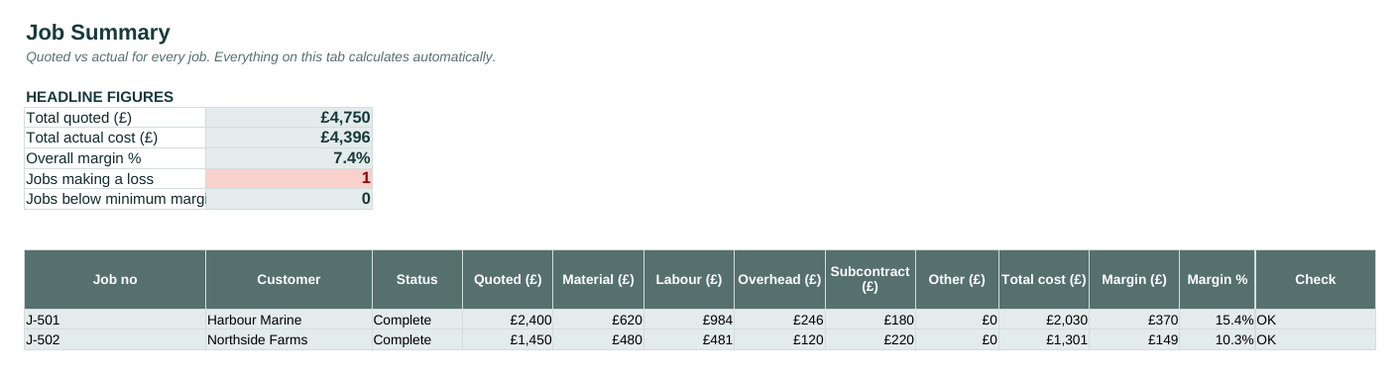
The Job Summary tab of the free job costing sheet template, filled in with example data
The Job Summary tab, with the example data it comes with. Blue cells are for typing; grey cells calculate.

What’s inside

Start Here
What it does, how to use it, and the key to which cells to type in.
Rates
Hourly labour rates for each work centre, your overhead percentage and your minimum margin.
Jobs
Each job with its customer, drawing number, revision and quoted price.
Costs
Every cost logged against a job as it happens: material with its cert or heat number, labour hours, subcontract and anything else.
Job Summary
Quoted against actual cost and margin for every job, with jobs below your minimum margin or making a loss flagged.

How to use it

  1. Set your labour rate for each work centre, your overhead percentage and the minimum margin you’re happy with.

  2. Add each job with its drawing number, revision and quoted price.

  3. Log costs against the job as they happen: material, labour hours, subcontract work.

  4. Check the Job Summary to see which jobs made money, and use the actuals to sharpen your next quote.

How to cost a fabrication job properly

Most small fabricators know roughly what a job costs, but “roughly” hides the jobs that lose money every time. The fix is to capture actual costs against each job as they happen, then compare them with the quote.

  • Material: what was actually used, including offcuts written off, with the cert or heat number so it’s traceable too.
  • Labour: hours at each work centre, multiplied by that centre’s rate. Welding and cutting rarely cost the same per hour.
  • Overhead: added as a percentage of labour, so rent, power and consumables aren’t forgotten.
  • Subcontract: galvanising, powder coating, laser cutting and anything else bought in.

What to do with the results

After a dozen jobs, patterns appear: a type of work that always overruns on welding, a customer whose jobs never make margin, a finish that costs more than you allow. That’s the information that makes your next quote right.

When the spreadsheet stops being enough

Mannin Systems does all of this as part of the day’s work: booked at the station as it happens, checked automatically, and linked to the jobs, stock and people involved. No retyping, and no Friday afternoon catching up.

See pricing

Questions about this template

What overhead percentage should I use?

Divide a year’s overheads (rent, rates, power, insurance, consumables, admin) by a year’s direct labour cost. Your accountant can give you both figures. The template’s 25% is only an example.

Should quoted prices include VAT?

No. Enter prices excluding VAT, so they compare like for like with your costs.

Does it work in Google Sheets?

Yes. Upload it to Google Drive and open it with Google Sheets. It also works in Excel and LibreOffice.

Tell us what you're running on now

A few lines about what you make and how you plan production today is plenty to start with, or simply ask for an introductory call. You'll get a personal reply.